How to download a TikTok video in 3 steps
- Copy the link. Open the video in the TikTok app or on tiktok.com. Tap Share, then Copy link.
- Paste it into Toltik. Come back to this page, tap the box at the top and paste the link. The Paste button does it in one tap on most browsers.
- Download the file. Tap Download. Pick the MP4 without watermark, the HD MP4 or the audio, and save it to your device.
What is Toltik, the free TikTok downloader?
Toltik is a TikTok downloader that runs in a web page. You give it the link of a public TikTok post, and it gives you back the files TikTok already serves for that post: the video without the moving watermark, an HD copy when one exists, the sound and the cover image.
There is nothing to install and nothing to sign up for. It works the same way on an iPhone, an Android phone, a tablet or a computer. It is free and there is no limit on how many videos you save.
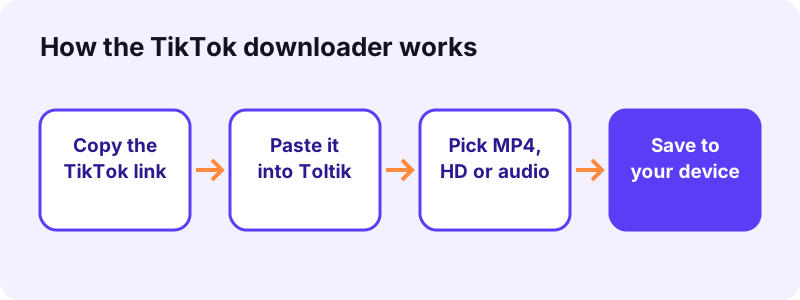
What you get from one link
- An MP4 without watermark (H.264, usually 576p–720p).
- An HD MP4 when TikTok stores one, often 1080p.
- The MP4 with watermark, when it is available.
- The sound as an audio file (MP3 or M4A/AAC, as TikTok stores it).
- Every picture of a photo slideshow as a JPG, plus the cover image.
Toltik also has separate pages for the other jobs people ask for most. Pick the one you need:
Why use a TikTok video downloader without watermark?
TikTok's own Save video button stamps a moving logo and the creator's username into the file. That is fine for a quick share. It gets in the way when you want to edit your own clip, post it on another platform or keep a clean copy.
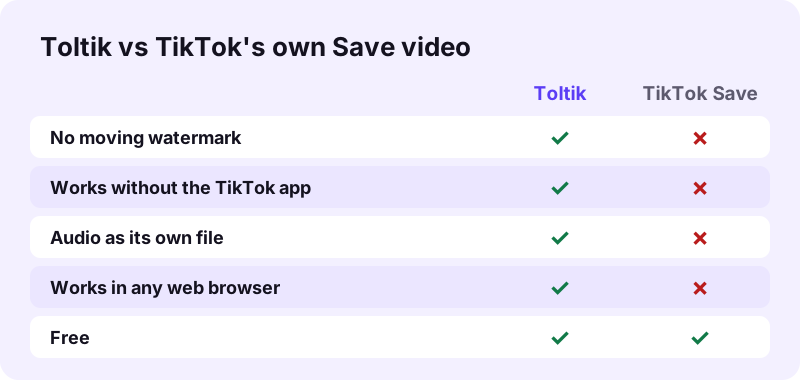
Good reasons to save TikTok videos
- Keep a backup of videos you made, in case you lose access to your account.
- Re-edit your own clip in a video editor without a logo jumping around the frame.
- Watch a recipe, workout or tutorial offline, on a plane or in the metro.
- Share a clip with a friend who does not use TikTok, with the creator credited.
Some creators turn off downloads in the app. Respect that choice: save other people's videos only for personal viewing, or when you have their permission. More on this in <a href="#use-the-tiktok-downloader-fairly">the fair-use section below.
How to download TikTok videos on iPhone and iPad
On iPhone and iPad you do not need an app or a shortcut. Safari on iOS 13 and later can download files, and it puts them in the Files app, in the Downloads folder.
- An iPhone or iPad on iOS or iPadOS 13 or later.
- Safari, which is already on your device.
- The Files app, also built in.
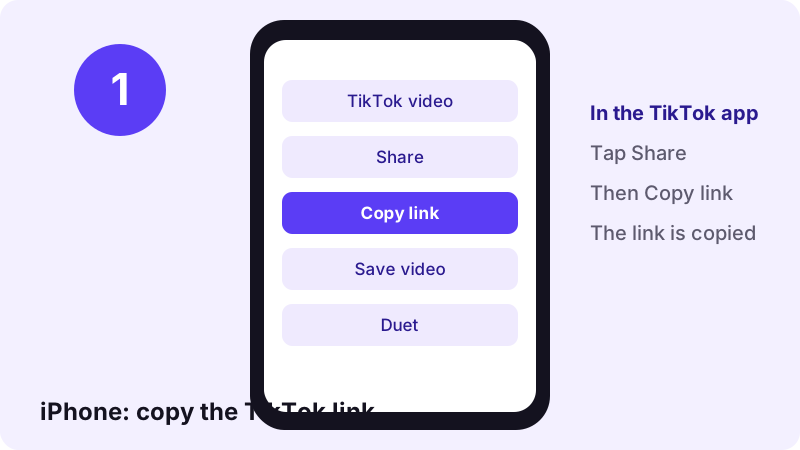
Step 1: copy the link in the TikTok app
Open the video, tap the Share arrow on the right side, then tap Copy link. The link is now on your clipboard.
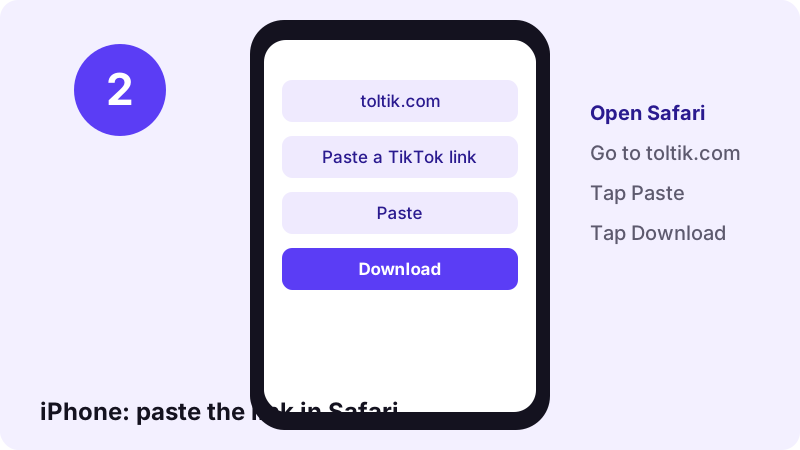
Step 2: paste it into the TikTok downloader in Safari
Open Safari and go to toltik.com. Tap the box, tap Paste, then tap Download. When the results appear, tap the file you want and confirm the download.
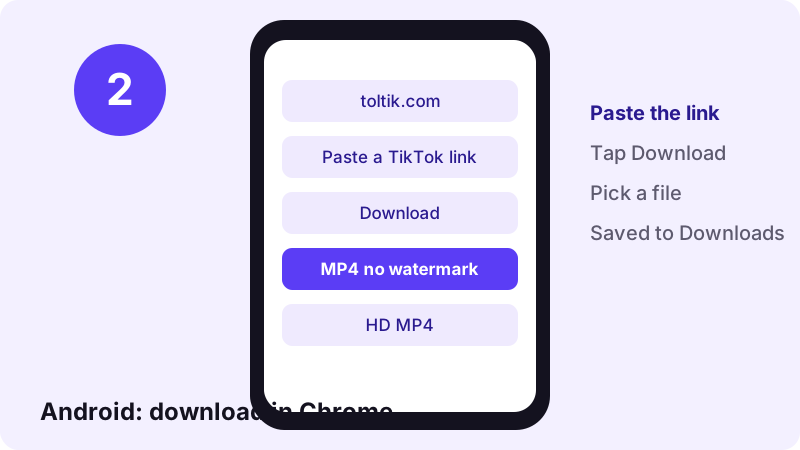
Step 3: move the MP4 to your Photos
Open the Files app, tap Browse, then Downloads. Tap the video, tap the share icon and choose Save Video to copy it to your Photos library.
How to save TikTok videos on Android
Android is the simplest case. Chrome, Samsung Internet, Firefox and other browsers all save files straight to the Downloads folder, and most gallery apps show new videos from there.
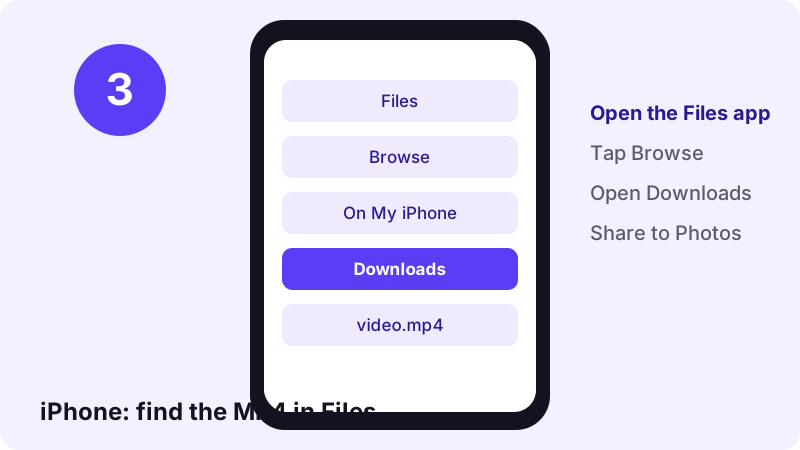
Copy the link on Android
In the TikTok app, tap Share, then Copy link. If you only see app icons, scroll the bottom row until the Copy link button appears.
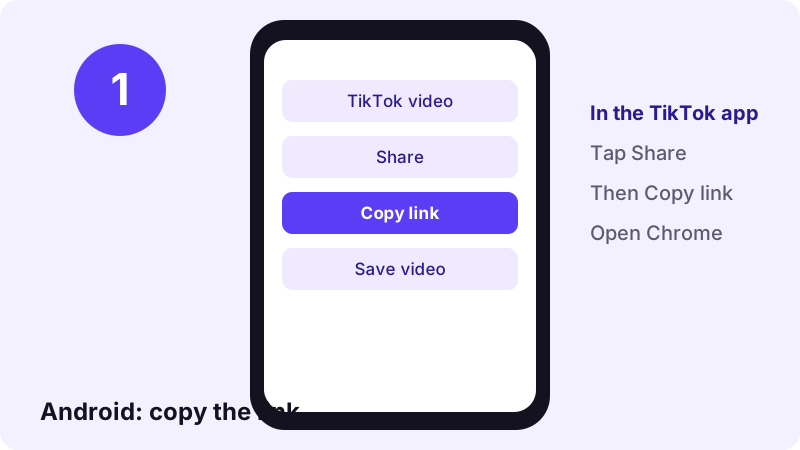
Download in Chrome
Open toltik.com in Chrome, paste the link and tap Download. Tap the MP4 without watermark or the HD MP4. A bar at the bottom shows when the file is saved.
Can't find the file? Open the Files or My Files app and look in Downloads. You can also open Chrome's menu and tap Downloads.
Use the TikTok downloader on Windows, Mac and Linux
On a computer you do not need the TikTok app at all. Open the video on tiktok.com, copy the address from the browser bar and paste it here. Chrome, Edge, Firefox, Safari and Brave all work.
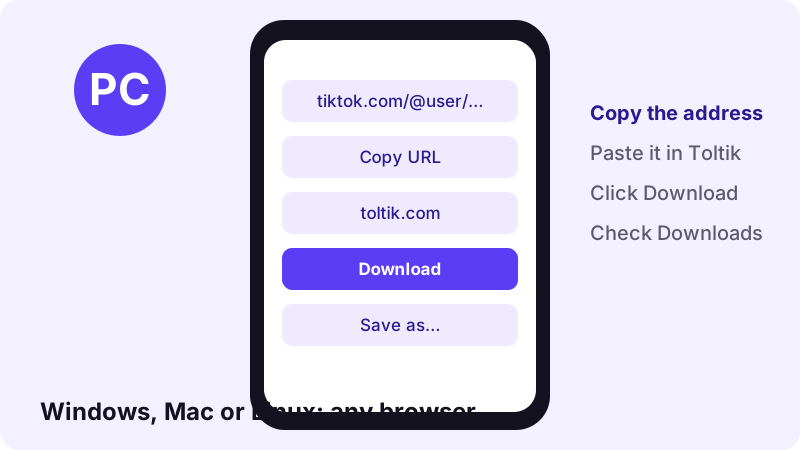
Where the file goes on a computer
- Windows: the
Downloadsfolder in File Explorer, unless your browser asks where to save. - Mac: the
Downloadsfolder in Finder, also shown in the Dock. - Linux:
~/Downloadsin most desktop setups.
Tip: if the browser opens the video in a new tab instead of saving it, right-click the video and choose Save video as….
Steps on every device at a glance
This TikTok downloader works the same way everywhere: copy, paste, download. Only the place where the file lands changes.
| Device | Browser | How to copy the link | Where the file goes |
|---|---|---|---|
| iPhone / iPad | Safari (iOS 13+) | Share → Copy link | Files → Downloads |
| Android | Chrome or any browser | Share → Copy link | Downloads folder |
| Windows | Chrome, Edge, Firefox | Copy the address bar | Downloads folder |
| Mac | Safari, Chrome, Firefox | Copy the address bar | Downloads folder |
| Linux | Any modern browser | Copy the address bar | ~/Downloads |
TikTok MP4 quality: standard and HD
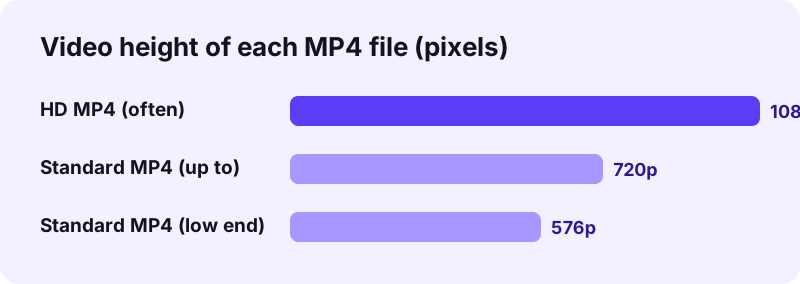
Toltik does not re-encode or upscale anything. You get the files TikTok stores for the post, so the quality is exactly what TikTok has. Most videos come in two sizes.
| File | Format | Typical quality | Watermark |
|---|---|---|---|
| MP4 without watermark | MP4, H.264 | Usually 576p–720p | No |
| HD MP4 | MP4, often H.265 (HEVC) | Often 1080p | No |
| MP4 with watermark | MP4, H.264 | Same as standard | Yes |
| Audio | MP3 or M4A (AAC) | As TikTok stores it | — |
| Slideshow photos | JPG | Original size | No |
When is the HD download available?
Only when TikTok keeps an HD copy of the video. That depends on how the creator uploaded it. If there is no HD copy, the HD button does not appear, and the standard MP4 is the best version that exists.
Will the H.265 file play on my device?
H.265 (also called HEVC) plays on recent iPhones, most Android phones and modern Macs and PCs. On an older computer, or in some video editors, it may not open. In that case, use the standard H.264 MP4, which plays almost everywhere.
Which TikTok links does the TikTok downloader accept?
Any link to a public TikTok post works, including the short links the app creates when you tap Copy link. You do not need to clean or shorten the link.
| Link type | Example | Works? |
|---|---|---|
| Video page | www.tiktok.com/@user/video/123… | Yes |
| Photo slideshow | www.tiktok.com/@user/photo/123… | Yes |
| Mobile link | m.tiktok.com/… | Yes |
| Short link | vm.tiktok.com/… or vt.tiktok.com/… | Yes |
| Private or deleted post | Any | No |
Some links point to a page, not to a post, so they will not work:
- A whole profile, like
tiktok.com/@user. - A hashtag or search page.
- A sound or music page.
- Open one video first, then copy that video's link.
Toltik vs screen recording vs TikTok's Save button
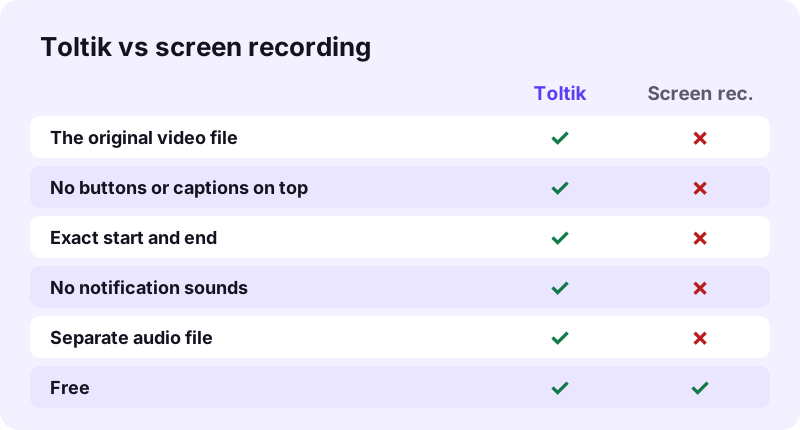
There are three common ways to save TikTok videos. Each one gives a different file.
Screen recording
A screen recording copies your screen, not the video. You get the like and comment buttons, the caption, any notification that pops up, and a start and end you have to trim by hand. The quality also drops a little.
TikTok's Save video button
The built-in button gives you the real video, but with the moving watermark and the username burned in. It is only there when the creator allows downloads.
A TikTok downloader like Toltik
A TikTok downloader fetches the original file TikTok serves, without the moving watermark, plus the HD copy and the sound when they exist. It is the cleanest copy of the three.
Save TikTok sounds, photos and stories too
The video is not the only thing people want to keep. Toltik has a page for each of the other common jobs.
- TikTok MP3: save only the sound of a TikTok as an audio file, for a ringtone or a playlist of your own clips.
- TikTok photo downloader: save every picture of a photo slideshow as a separate JPG.
- TikTok story downloader: save a public story while it is still live, within 24 hours.
Is this TikTok downloader safe and private?
You never log in, so Toltik never sees your TikTok password or account. The only thing you give it is a link to a public post.
- No account, no sign-up and no app to install.
- Toltik does not store the videos.
- Download links expire after 1 hour.
- The person who posted the video is not told that you saved it.
Read our privacy policy for the details, or the about page to learn who runs Toltik. Toltik is independent and is not affiliated with TikTok.
Use the TikTok downloader fairly
Being able to download a video does not mean you can reuse it. The creator still owns it. Keep these simple rules in mind.
- Download your own videos freely: they are yours.
- Save other people's videos for personal viewing only, unless you have permission.
- Ask the creator before you repost, remix or use a clip in your own content.
- Always credit the creator by name when you share their work.
- Never sell, monetise or claim someone else's video as your own.
Copyright rules differ from country to country, and this is not legal advice. If you own a video and want to report a misuse, see our DMCA page.
Troubleshooting: when a TikTok download fails
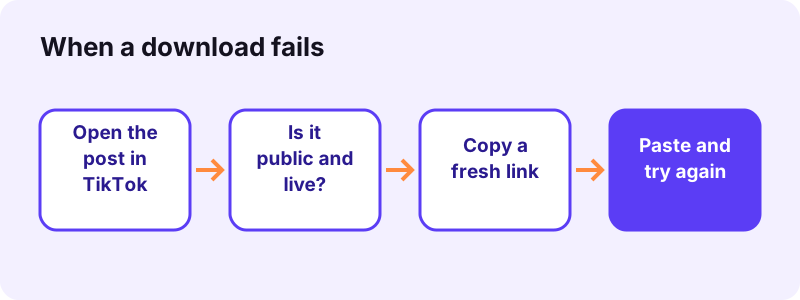
Most errors have a simple cause. Start by opening the link in TikTok yourself: if you cannot watch it there while logged out, Toltik cannot fetch it either.
- Open the link in TikTok while logged out.
- Check the post is still online and public.
- Copy a fresh link with Share → Copy link.
- Paste it here and tap Download again.
| What you see | Likely cause | What to do |
|---|---|---|
| We could not read that post | The account or the video is private | Only public posts can be downloaded. Ask the creator to send you the file. |
| We could not read that post | The video was deleted | It no longer exists on TikTok, so there is nothing to download. |
| We could not read that post | The post is blocked in a region | Some posts are not available in every country. There is no fix on our side. |
| The download link stopped working | Links expire after 1 hour | Paste the TikTok link again to get a fresh download link. |
| Paste a TikTok link… | The text is not a TikTok post link | Copy the link again with Share → Copy link. Profile and hashtag links do not work. |
| Network error | Your connection dropped | Check your connection and tap Download again. |
Short links from vm. and vt.
Short links like vm.tiktok.com and vt.tiktok.com work. If one fails, open it in your browser, wait for the full TikTok page to load, then copy the long address and paste that.
The video plays but has no sound
Some sounds are muted by TikTok for copyright reasons, and that silence is in the file itself. Also check that your phone is not on silent mode and that the volume is up.
Tips to get the best TikTok MP4
- Pick the HD MP4 when it appears: it is usually the sharpest file.
- Need it in an older editor? Pick the standard MP4: H.264 opens almost everywhere.
- Saving a lot of clips? Download them one by one right away, because each download link lasts 1 hour.
- On iPhone, move videos from Files to Photos so they show up in your camera roll.
- Want just the music? Use the TikTok MP3 page instead of converting the video yourself.
That is all there is to it. Copy a link, paste it into the TikTok downloader at the top of this page, and save TikTok videos in a few seconds.
Frequently asked questions
How do I download a TikTok video without the watermark?
Copy the video's link with Share → Copy link, paste it into the box at the top of this page and tap Download. Then pick the MP4 without watermark or the HD MP4.
Is this TikTok downloader free?
Yes. Toltik is free, needs no account and has no limit on the number of videos you download.
Do I need to install an app?
No. Toltik works in the browser you already have: Safari, Chrome, Firefox, Edge or any modern browser, on phone or computer.
Where do downloaded TikTok videos go on iPhone?
Safari saves them in the Files app, in the Downloads folder. Open the file, tap the share icon and choose Save Video to move it to Photos.
Can I download TikTok videos in HD or 1080p?
Yes, when TikTok stores an HD copy. The HD MP4 is often 1080p. If no HD copy exists, the standard MP4 (usually 576p–720p) is the best version available.
Can I download private TikTok videos?
No. Toltik only works with public posts. Private, deleted and region-blocked videos cannot be downloaded.
Does the creator know if I download their TikTok?
No. Toltik does not notify anyone. Still, credit the creator and ask permission before you reuse their video.
Can I save only the sound of a TikTok as MP3?
Yes. The result shows an audio button, and the TikTok MP3 page is made just for that. The file is MP3 or M4A, depending on how TikTok stores the sound.
Can I download TikTok photo slideshows?
Yes. Paste the slideshow link and every picture is offered as a separate JPG. See the photo downloader page.
Why does my download link stop working?
Toltik does not store videos, and each download link expires after 1 hour. Paste the TikTok link again to get a new one.
Is it legal to download TikTok videos?
Saving your own videos is fine. For other people's videos, keep them for personal viewing or get the creator's permission before you share or reuse them. Rules vary by country.